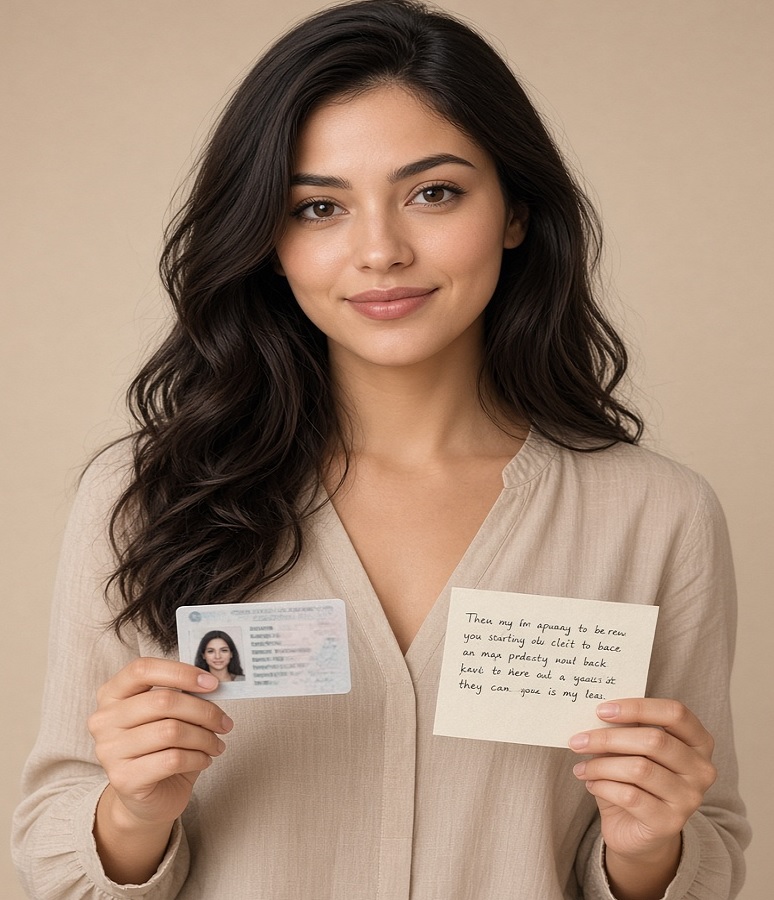
Before you start, review the sample document
Dear user, please read the notes below and then complete the verification form. The confirmation email usually lands in your spam folder.
National ID card in one hand, handwritten commitment note in the other
- The photo must be clear, high quality and taken like the sample.
- National ID card in one hand and the handwritten note in the other, both in a single photo.
- Do not send a photo of the national ID card or bank card alone.
- If a bank card appears in the photo, you must cover the CVV2.
Commitment text: For identity verification on the BitGrand website, I accept the website's terms and take full responsibility for all transactions made with these documents and this user account.
If you have a problem or question, contact support: 02128423217 or WhatsApp 09353810897.
To view the verification form, please sign up and log in to your account first.
To buy crypto and trade in high volumes without identity verification, contact our head office or WhatsApp.
Log in to your dashboard and choose Verification
Name, national ID number, mobile and date of birth exactly as on the document
National ID card in one hand and the handwritten note in the other
Document review usually takes 1 to 24 hours
What is identity verification?
Identity verification, or KYC, is a check of your identity details to make sure the account is genuine and no forged document has been used. It usually involves ID documents and a selfie.
Why is it required at BitGrand?
For account security, preventing financial fraud, protecting users' rights, higher withdrawal limits and fuller access to the site's features.
Can I use the platform without verification?
Rial withdrawals and full features are not unlocked without verification. High-volume trading without verification is only possible by arrangement with our head office.
Are my documents kept safe?
Documents are used only to verify your identity and may not be disclosed. Do not send blurry images, and the handwritten note must be legible.
What if it is rejected?
Support will tell you the reason. After fixing it, submit the same form again. Using someone else's document will get the account blocked.